If you’ve ever wondered how someone can send an email that looks like it’s from your bank, or how “email spoofing” is even possible in the first place, the answer starts here: not with some clever hack, but with how the underlying protocol was built. SMTP (Simple Mail Transfer Protocol) is what actually moves email between servers, and understanding it is the foundation for understanding phishing, spoofing, and how SPF/DKIM/DMARC try to fix what SMTP doesn’t check on its own.
This isn’t meant to be a dense protocol spec. If you’re new to this, the goal is that you walk away actually understanding what’s happening when an email gets sent, not just memorizing port numbers.
Where this fits
This article covers the protocol itself: ports, encryption, the actual transaction, and what a SOC analyst looks for in the headers. For how this gets weaponized into phishing, and how SPF/DKIM/DMARC defend against it, see Email Phishing and Spoofing.
Why Are There Three (or Four) Ports for Email?
This confused me for a while, so it’s worth addressing directly: it’s not that port 587 or 465 “replaced” port 25 as some kind of update. All of them are still in use today; they just serve different purposes.
| Port | Name | Purpose | Encryption | Who Uses It |
|---|---|---|---|---|
| 25 | SMTP | Server-to-server relay | Optional (STARTTLS) | Mail servers talking to each other |
| 587 | Submission | Client-to-server submission | STARTTLS (required) | Your email client sending to YOUR server |
| 465 | SMTPS | Client-to-server submission | Implicit TLS (encrypted from the start) | Same job as 587, but encrypted immediately |
| 2525 | — | Alternate submission | Same role as 587 | Used when 587 is blocked on a network |
A few things worth knowing about how this plays out in practice:
- Port 25 is still what servers use to talk to each other, and that’s the port the transaction walkthrough later in this article runs on.
- Port 587 is what your Outlook or Thunderbird client uses to send mail to your own provider.
- Port 465 does the same job as 587, but the connection is encrypted from the very first packet instead of upgrading partway through.
- Most ISPs block outbound port 25 for regular home users specifically to cut down on spam which is part of why 587/465 exist for client submission in the first place.
One correction worth making here: SSL is deprecated. What port 465 does today is technically implicit TLS; the “SSL” label stuck around from when the port was first defined, but modern implementations are running TLS, not the old SSL protocol.
TLS: The Part That Actually Does the Encrypting
Since STARTTLS and implicit TLS both come up above, here’s what they’re actually doing:
- STARTTLS starts the connection in plaintext and then upgrades it to an encrypted one, if both sides support it. This is what happens on port 587.
- Implicit TLS encrypts the connection from the very first byte, with no plaintext phase at all. This is what happens on port 465.
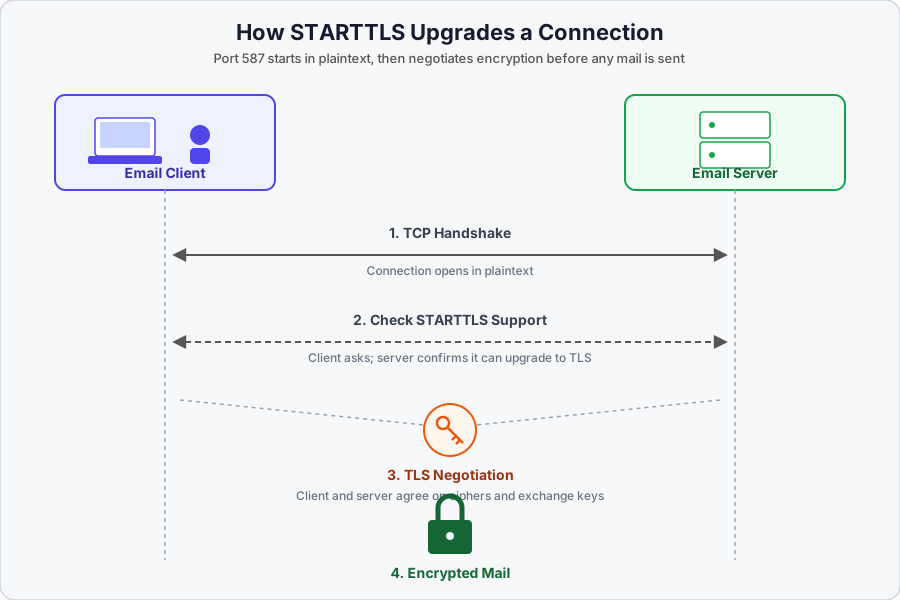
The diagram above shows the STARTTLS handshake: the client connects over TCP, checks whether the server supports STARTTLS, negotiates the TLS session, and only then starts sending the actual mail encrypted.
If you’re comparing TLS versions, the jump from TLS 1.2 to TLS 1.3 is a meaningful one:
| Feature | TLS 1.2 (Old Standard) | TLS 1.3 (Modern Standard) |
|---|---|---|
| Handshake speed | Requires two round trips to establish a connection | Requires only one round trip, cutting setup time in half |
| Repeat visits (0-RTT) | Must perform the full handshake again each time | Supports Zero Round-Trip Time (0-RTT), letting data start flowing instantly |
| Handshake privacy | Conducted in clear text, so metadata can be intercepted | Mostly encrypted, protecting certificates and identity |
| Cipher suites | Supports hundreds of combinations, many now weak or broken | Stripped down to a handful of secure AEAD-based suites |
| Forward secrecy | Optional, so a compromised key could decrypt past traffic | Mandatory; every session uses unique keys |
And since “SSL” and “TLS” get used interchangeably in casual conversation even though SSL is retired, here’s the practical difference in what breaks when something goes wrong:
| Feature | SSL (Secure Sockets Layer) | TLS (Transport Layer Security) |
|---|---|---|
| Error messages | Alerts are sent unencrypted; so anyone listening can see something went wrong, but only vague details | Alerts are encrypted; so only sender and receiver see the (much more detailed) error |
| Encryption & keys | Older methods (RC4, MD5) that are easy to break today | Modern methods (AES-GCM) that are far harder to crack |
| Handshake | Complex, slower, happens all at once | Faster: a quick “hello” over an open connection, then locks it down |
How Email Actually Moves: A Typical Business Scenario
Here’s the full path an email takes, spelled out hop by hop:
YOU (Sender/Human)
  ↳ writes email in...
SENDER'S EMAIL CLIENT (Gmail web UI, Outlook, Thunderbird)
  ↳ sends via SMTP (port 587 or 465)
SENDER'S SMTP SERVER (smtp.gmail.com, smtp.office365.com)
  ↳ sends via SMTP (port 25) to...
RECEIVER'S MAIL SERVER (mx.google.com, mail.company.com)
  ↳ stores in mailbox, retrieved via...
RECEIVER'S EMAIL CLIENT (using IMAP port 993 or POP3 port 995)
  ↳ reads email
RECIPIENT (Human)
One thing worth being precise about: SMTP is only used for sending and relaying mail. It’s never used by the recipient to actually read their mail; that’s IMAP or POP3’s job. This distinction matters when debugging: SMTP problems are send-side, IMAP/POP3 problems are read-side.
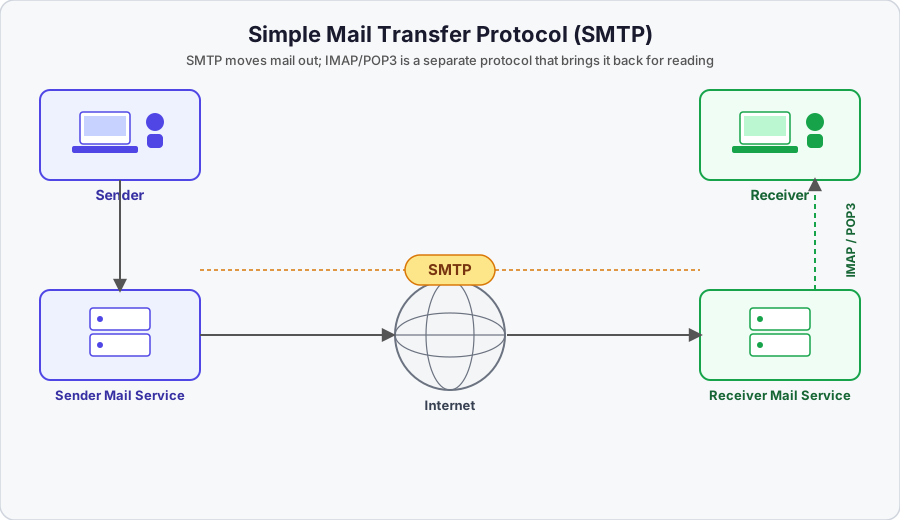
A simple overview of the sender → SMTP → internet → receiver flow, including where IMAP/POP3 come in on the retrieval side.
Third-Party Relay Services
A lot of real business email doesn’t go directly from a company’s server to the recipient; it goes through a third-party relay service like SendGrid, Mailchimp, Amazon SES, or Mailgun, sitting between the sender and the receiver’s server:
YOU (Sender)
  ↳
YOUR APP / WEBSITE (via SendGrid API or SMTP)
  ↳ authenticates with SendGrid using API key
SENDGRID'S SMTP SERVERS (smtp.sendgrid.net)
  ↳ sends via SMTP port 25 to...
RECEIVER'S MAIL SERVER
  ↳
RECIPIENT
Why companies use them: running your own mail server is genuinely hard to maintain: you have to protect your sending reputation, avoid getting blacklisted, and handle bounces yourself. Relay services also handle SPF/DKIM signing for you, provide delivery tracking and analytics, and have the infrastructure to handle the volume a company sending millions of emails actually needs.
How it looks in the headers, once a relay is involved:
Return-Path: <bounces+12345@sendgrid.net>     ← SendGrid's bounce handler
From: Your Company <hello@yourcompany.com>     ← what the recipient sees
Received: from sendgrid.net (...)              ← proof SendGrid relayed it
SOC note
Phishers abuse these same relay services. A phishing email might legitimately come through SendGrid, which means it will pass SPF, because SendGrid is an authorized sender. This is exactly why DKIM and DMARC matter on top of SPF: they catch the identity misalignment even when the relay itself is completely legitimate.
Watching It Happen: A SMTP Transaction, Step by Step
The clearest way to actually understand this is to watch an SMTP session happen. What follows is a realistic telnet session on port 25: the commands, response codes, and sequence are exactly how a real transaction plays out. The domain, addresses, IP, and server names have been swapped for made-up, documentation-style values (203.0.113.0/24 is an IP range officially reserved for examples like this; it’s never assigned to a real server) so nothing here points at a real company or a real mail server.
Trying 203.0.113.10...
Connected to mx1.receivingmail.test.
Escape character is '^]'.
220 mx1.receivingmail.test ESMTP a1b2c3d4e5.10 - relay
helo northbridgeanalytics.io
250 mx1.receivingmail.test at your service
mail from: <alex@examplemail.test>
250 2.1.0 OK a1b2c3d4e5.10 - relay
rcpt to: <test@receivingmail.test>
250 2.1.5 OK a1b2c3d4e5.10 - relay
data
354 Go ahead a1b2c3d4e5.10 - relay
From: Alex Rivera <alex@northbridgeanalytics.io>
Reply-to: <noreply@northbridgeanalytics.io>
Subject: Hello!

This is an example.
.
250 2.0.0 f9e8d7c6b5a4 Message accepted for delivery
Let’s break down what’s actually happening, phase by phase.
Phase 1: TCP connection setup. The sender’s machine attempts a TCP connection to the receiving mail server at IP 203.0.113.10 on port 25, and connects to mx1.receivingmail.test. Whoever is connecting here is acting as the sender’s SMTP server (or simulating one via telnet), and is about to claim to be from northbridgeanalytics.io.
Phase 2: Server greeting banner. 220 means “service ready”: the server identifying itself as mx1.receivingmail.test and accepting connections. ESMTP means it supports Extended SMTP (AUTH, STARTTLS, and other modern features). a1b2c3d4e5.10 is a session/transaction ID: the receiving server’s internal tracking number for this specific connection, useful for debugging.
Attack path: banner grabbing 🚩
This banner is the first thing you see in a packet capture. Attackers sometimes connect to port 25 purely to grab this banner and fingerprint what mail software is running on the other end.
Phase 3: HELO/EHLO (client introduction). The sending server introduces itself with helo northbridgeanalytics.io. HELO is the old-school greeting; EHLO is the modern version that also requests extended features. This is the sender telling the receiving server its domain name.
Attack path: the unverified claim 🚩
The server does not verify this claim at the SMTP level. You could type
helo anything.comand it would still work. This is exactly why email spoofing is possible at the protocol level; it’s the gap SPF, DKIM, and DMARC exist to close.
Phase 4: MAIL FROM (envelope sender). mail from: <alex@examplemail.test> sets the envelope sender, also called the return path or bounce address. If delivery fails, the bounce message goes back to this address. This is not the “From:” header the recipient will see; that gets set later, in the DATA section.
Attack path: the separation that enables spoofing 🚩
The envelope sender and the visible “From” header are set completely separately, and nothing forces them to match. That separation is exactly what makes email spoofing possible.
Phase 5: RCPT TO (envelope recipient). rcpt to: <test@receivingmail.test>. You can issue multiple RCPT TO commands in a single transaction. The 2.1.5 response code confirms the destination mailbox exists and will accept mail.
Phase 6: DATA (the actual email content). This is where the visible email (headers and body) actually gets written. Once you type data, the server responds 354 Go ahead and starts listening for content, ending when it sees a single period on its own line.
Look closely at what the sender put in the headers here:
From: Alex Rivera <alex@northbridgeanalytics.io>
Reply-to: <noreply@northbridgeanalytics.io>
Subject: Hello!

This is an example.
Attack path: the mismatch that makes spoofing real 🚩
The envelope sender (
MAIL FROM) claimed<alex@examplemail.test>. The headerFrom:the recipient will actually see saysAlex Rivera <alex@northbridgeanalytics.io>. These don’t match, and nothing in the transaction stopped that. This exact mismatch is what SPF and DMARC are built to catch.
The Reply-to header is a separate trick: it tells the recipient’s email client “if the user hits reply, send it here instead of the From address”; attackers can use this to redirect responses without touching the visible sender address at all.
Phase 7: Server accepts the message. 250 2.0.0 ... Message accepted for delivery. Worth remembering that “accepted” does not mean “delivered to the inbox.” The message still has to clear spam filtering and DMARC evaluation before it lands anywhere.
Reading SMTP response codes at a glance
2xx= success ·3xx= keep going, more input expected ·4xx= temporary failure, retry later ·5xx= permanent failure, stop.
What This Looks Like From the Investigating Side
The envelope-vs-header trick isn’t just a curiosity; it’s the exact mismatch you’re looking for when investigating a suspected spoofed email:
mail from: <attacker@evil.com>       ← envelope (hidden from user)
...
From: CEO <ceo@yourcompany.com>      ← header (what the victim sees in their inbox)
This is a classic Business Email Compromise (BEC) pattern: the header claims to be an executive, while the envelope tells a completely different story underneath.
Why the Envelope Is “Hidden”
It’s not encrypted or secret; it’s just not displayed by email clients by default. It’s the email equivalent of how your mail carrier reads the outside of an envelope to deliver it, then you open it and only read what’s inside. The envelope information does get saved into a header called Return-Path, but most people never click “Show Original” or “View Headers” to actually see it.
Return-Path: <alex@examplemail.test>              ← envelope sender, buried in headers
From: Alex Rivera <alex@northbridgeanalytics.io>  ← what you see in your inbox
SOC relevance
When investigating phishing, always check
Return-Pathand compare it toFrom. If they don’t match and there’s no legitimate reason for it (like a mailing list), that’s a red flag.
RCPT TO as a Recon Tool
Attackers can also abuse RCPT TO for reconnaissance, watching how the server responds to figure out which addresses actually exist:
rcpt to: <admin@target.com>
250 OK                              ← address exists

rcpt to: <fake123@target.com>
550 User unknown                    ← address doesn't exist
Attackers enumerate valid email addresses this way by watching for 250 versus 550 responses across a range of guessed usernames.
Detection & SOC Relevance
Why this matters for SOC work: every phishing email, BEC attack, and spam campaign follows this exact transaction flow. Analyzing email headers during an incident is effectively reverse-engineering this conversation. A few key things worth looking for:
- Envelope vs header mismatch:
MAIL FROMsays one domain,From:says another. A classic spoofing indicator. - HELO/EHLO mismatches: the claimed domain doesn’t match the connecting IP’s reverse DNS.
- Session IDs: can be used to trace specific transactions through mail server logs.
- Response codes in logs: repeated
550errors can indicate reconnaissance (an attacker testing which addresses exist).
SMTP Response Code Cheat Sheet
| Code | Category | Meaning |
|---|---|---|
220 | Connection | Server ready, go ahead |
250 | Success | Command completed OK |
354 | Intermediate | Ready for message data, send it |
421 | Temp failure | Service not available, try later |
450 | Temp failure | Mailbox busy, try later |
500 | Permanent error | Syntax error / command not recognized |
550 | Permanent error | Mailbox not found / action not taken |
553 | Permanent error | Mailbox name not allowed |
Pattern to remember: 2xx = good, 3xx = keep going, 4xx = temporary problem (retry), 5xx = permanent problem (stop).
A Common Question: Does SMTP’s Encryption Involve Certificates?
This came up while learning this material, and it trips a lot of people up: does an SSL/TLS connection in SMTP involve a device certificate, a user certificate, or both?
SSL/TLS in SMTP typically requires a server certificate (device certificate) to encrypt the connection and verify the server’s identity to the client. A user/client certificate is usually optional, and only used in mutual TLS (mTLS) scenarios for heightened security.
- Server certificate (device): required for the mail server to identify itself and establish the encrypted tunnel.
- Client/user certificate: optional, typically only used for authentication in high-security environments where both sides authenticate each other (mTLS).
- STARTTLS is the alternative to explicit SSL/TLS: it upgrades an already-open, insecure connection into a secure one using these certificates, rather than starting encrypted from the first byte.
In most standard SMTP submissions, the server provides a certificate, and the client does not.
Key Takeaways
- SMTP has several ports (25, 587, 465, and sometimes 2525) that serve different roles (server-to-server relay versus client submission), not different “versions” of the same thing.
- SMTP was never designed to verify sender identity. HELO/EHLO and the envelope sender (
MAIL FROM) are effectively unverified claims at the protocol level. - The envelope sender and the visible header sender are two completely separate fields, set at different points in the transaction, and nothing forces them to match.
- Third-party relay services are a normal, legitimate part of how business email works, but they’re also a way phishing can legitimately pass SPF, which is exactly why DKIM and DMARC matter.
- “Accepted for delivery” is not the same as “delivered to the inbox”; plenty of filtering happens after this point.
- The mismatch between
Return-Path/MAIL FROMand the visibleFrom:header is one of the first things worth checking when investigating a suspected phishing email.
Related Reading
For how this protocol-level gap actually gets weaponized into phishing and spoofing, and how SPF, DKIM, and DMARC work together to catch it, see Email Phishing and Spoofing