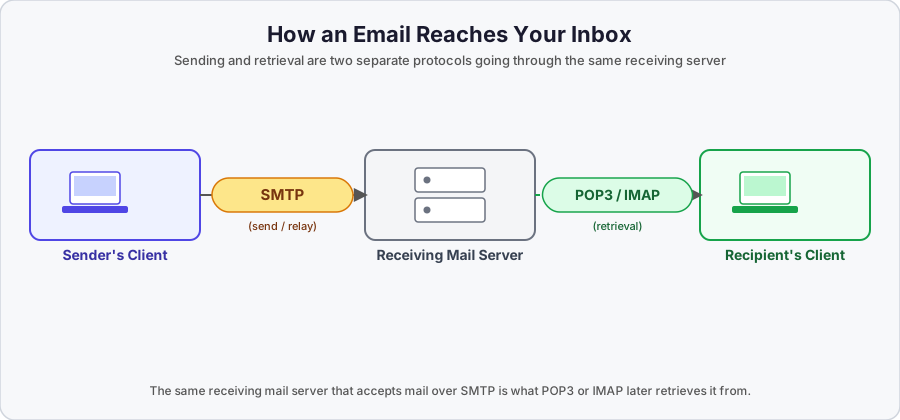
Sending an email and receiving one are two completely different jobs on two completely different protocols. SMTP handles the sending and relaying side; it was never built to hand mail to a recipient’s inbox. That job belongs to two other protocols: POP3 and IMAP.
Where this fits
This article covers how a recipient’s mail client actually pulls mail down from the receiving server. For the sending/relay side (ports, TLS, the raw SMTP transaction), see SMTP - LAYER 7 - Application.
Why SMTP Alone Can’t Do Retrieval
SMTP’s job ends once a message has been relayed to the recipient’s mail server. It has no concept of a mailbox, no way to list messages, no way to mark something as read, and no login flow for a client to pull mail down. It’s a one-way, push-oriented protocol built for moving a message from one server to the next, not for a client to sit there and browse an inbox.
So a second protocol has to take over on the receiving end: the recipient’s mail client (Outlook, Thunderbird, the Gmail app, whatever you use) doesn’t speak SMTP to get its mail. It speaks either POP3 or IMAP to the receiving server instead.
POP3 (Post Office Protocol v3)
- Port 110 (unencrypted) / Port 995 (encrypted with TLS)
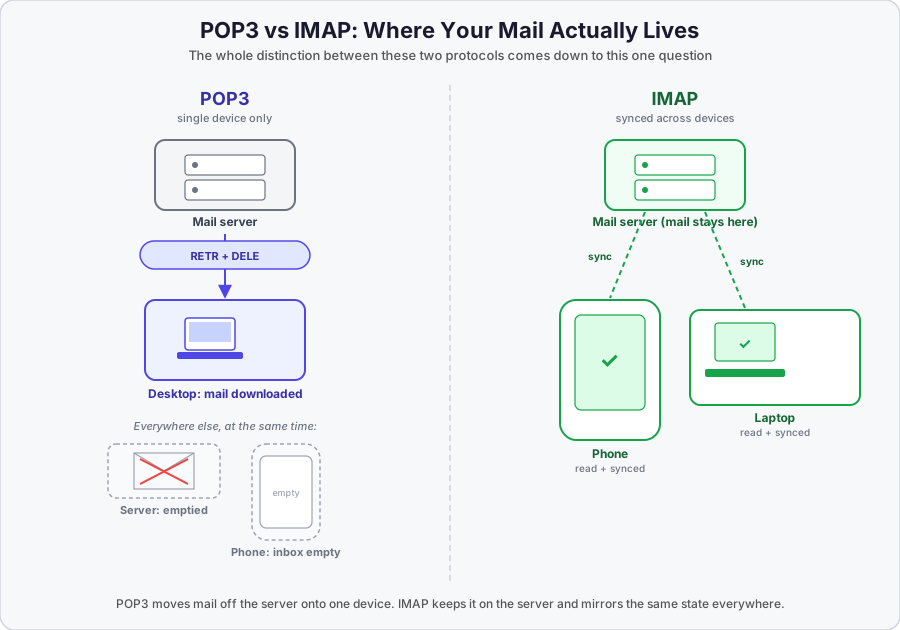
- Downloads email to your device, and by default removes it from the server once downloaded
- Single-device: whatever you download onto one machine is gone from everywhere else
- Simple, old, lightweight
Think of it like this: you walk to the post office, grab your mail, and take it home. Once it’s in your hands, it’s not sitting at the post office anymore.
You download emails on your desktop via POP3 → emails removed from server
You check your phone → inbox is empty
The emails only exist on your desktop now. If you didn’t set up your client to leave a copy on the server (most clients have this as an option, off by default in the classic POP3 sense), that’s it, they’re gone from the server.
A real POP3 session is just a short back-and-forth of plaintext commands over that TCP connection. Illustrative structure, not a captured session:
USER alex
PASS ********
STAT
LIST
RETR 1
DELE 1
QUITUSER/PASS log in, STAT and LIST check what’s waiting, RETR pulls a specific message down, DELE marks it for deletion, and QUIT commits the deletion and closes the session.
IMAP (Internet Message Access Protocol)
- Port 143 (unencrypted) / Port 993 (encrypted with TLS)
- Keeps email on the server and syncs state across every device you use
- Same inbox on your phone, laptop, and tablet, always
- Supports folders, search, flags, and partial message download (you can pull down just the headers before deciding whether to fetch the whole body)
Think of it like this: the post office keeps your mail. You just visit and read it, and whatever you do while you’re there (read it, flag it, delete it) is reflected the next time you visit, from anywhere.
You read an email on your phone → marked as "read"
You open your laptop → same email shows as "read"
You delete it on your laptop → gone from your phone too
That’s IMAP keeping everything in sync on the server, rather than each device holding its own separate copy.
Same idea as the POP3 example, illustrative structure only:
LOGIN alex password
SELECT INBOX
FETCH 1 (BODY[HEADER])
SEARCH UNSEEN
STORE 1 +FLAGS (\Seen)
LOGOUT
SELECT opens a specific mailbox/folder, FETCH can pull just the headers or the full message, SEARCH can filter (here, unseen messages), and STORE changes flags like read/unread without downloading or deleting anything. That flag-and-folder granularity is the whole reason IMAP needs a much richer command set than POP3’s “list it, grab it, delete it.”
POP3 vs IMAP at a Glance
| POP3 | IMAP | |
|---|---|---|
| Mail storage | Downloaded to device, removed from server by default | Stays on the server |
| Multi-device sync | No, one device only | Yes, full sync across devices |
| Folders/flags | Not supported | Fully supported |
| Partial download | No | Yes (headers only, then full body if needed) |
| Offline access | Full offline copy, since mail lives locally | Depends on client caching |
| Typical use today | Legacy systems, local archival | Standard for Gmail, Outlook, Yahoo, etc. |
| Unencrypted / TLS ports | 110 / 995 | 143 / 993 |
A Bit of History
POP3 and IMAP came out of the same rough era but were built around different assumptions about how people would actually use email.
POP itself goes back to RFC 918 in 1984, but POP3 specifically wasn’t defined until RFC 1081 in 1988, and the version still in use today comes from RFC 1939 in 1996. IMAP’s underlying design dates to 1986, though the version everyone actually runs, IMAP4rev1, wasn’t standardized until RFC 3501 in 2003.
Those dates line up with a real shift in how people used computers. In the mid-1980s, “one person, one computer” was a reasonable assumption, and POP3’s download-and-delete model fit that world fine. By the time IMAP4rev1 caught on in the 2000s, “one person, multiple devices” (desktop, laptop, phone) had become the norm, and a protocol that just dumps mail onto whichever device happens to ask for it first stopped making sense. IMAP’s whole design (keep the mail on the server, let every device see the same synced state) is a direct answer to that shift.
Why IMAP Dominates Today
Gmail, Outlook, and Yahoo all default to IMAP (or a proprietary API that behaves the same way, syncing state on the server side rather than handing mail off to one device). It’s the only sane option once people expect to read the same inbox from a phone, a laptop, and a tablet without losing track of what they’ve already seen.
POP3 hasn’t disappeared, though. It still shows up in legacy systems, and in specific scenarios where someone genuinely wants a local, offline copy of their mail and doesn’t care about multi-device sync, some backup and archival tools still use it for exactly that reason.
Authentication: Why This Actually Matters for Security
Both POP3 and IMAP traditionally authenticate with a plain username and password (USER/PASS, LOGIN), sent as plaintext commands unless the session is running over the encrypted port (995/993). Run either protocol unencrypted, and the login credentials are sitting in cleartext on the wire, the same category of problem STARTTLS solves on the SMTP side.
That’s not just a theoretical risk. Google has been actively phasing out plain password login for exactly this reason: starting in summer 2024, Google began blocking new connections from apps still using basic username/password authentication (what it calls “less secure apps”) for IMAP, SMTP, and POP against Gmail accounts, and as of March 14, 2025, basic authentication for those protocols was turned off entirely for all Google accounts. The replacement is OAuth 2.0, specifically the XOAUTH2 mechanism for IMAP, where a client authenticates with a token instead of a password. Microsoft has been enforcing the equivalent shift for Exchange Online.
The practical effect: a mail client that still tries to log into IMAP with a raw password against Gmail or Outlook today simply won’t authenticate anymore. This is worth knowing both as a “why did my old script/client break” answer and as a genuinely good example of an industry-wide move away from password-only authentication toward token-based auth, on protocols that are otherwise 30-plus years old.
The Complete Port Picture
| Protocol | Purpose | Unencrypted Port | Encrypted Port |
|---|---|---|---|
| SMTP | Server-to-server relay | 25 | 25 + STARTTLS |
| SMTP Submission | Client sends to own server | 587 + STARTTLS | 465 (implicit TLS) |
| POP3 | Client downloads email | 110 | 995 |
| IMAP | Client syncs email | 143 | 993 |
Key Takeaways
- SMTP sends and relays mail; it has no concept of a mailbox. POP3 and IMAP are the protocols that actually let a client retrieve mail from the receiving server.
- POP3 downloads mail to one device and removes it from the server by default: simple, but no multi-device sync.
- IMAP keeps mail on the server and syncs state (read/unread, flags, folders) across every device that connects.
- The shift from POP3 to IMAP tracks a real shift in how people use email: one device in the 1980s, multiple devices by the 2000s.
- Both protocols traditionally authenticate with a plaintext username/password unless run over their encrypted port, and that’s exactly why Google and Microsoft have been actively deprecating basic password login for IMAP/POP in favor of OAuth2 (XOAUTH2).
- For the sending/relay half of this picture, see SMTP - LAYER 7 - Application.