Phishing sounds simple on paper: “an attacker sends a fake email.” But the reason it still works constantly, against companies with spam filters and security teams, comes down to something most people never think about: email was never built to verify who’s actually sending it. Everything SPF, DKIM, and DMARC do today exists to patch that gap after the fact.
If none of the acronyms above mean anything to you yet, that’s fine; this article is written to build up from zero, not assume you already know them.
Where this fits
This article focuses on why spoofing is possible and how SPF/DKIM/DMARC defend against it. For the full protocol-level walkthrough of how an email actually moves from sender to receiver (ports, encryption, the raw SMTP transaction), see SMTP - LAYER 7 - Application.
Why This Still Works
A few examples of what this actually looks like in practice:
- A forged email address like
support@trustedbank.comlands in someone’s inbox, with a link that goes to a fake website masquerading as the bank’s real portal. - An email spoofed to look like it’s coming from one of a company’s actual business partners.
- Business Email Compromise (BEC): an attacker impersonates a senior executive and asks someone in finance to wire company funds overseas.
None of these require breaking into anything. They rely on the fact that an email’s “From” address is, by default, just text; nobody at the protocol level checks whether the sender is allowed to claim that identity. And a well-crafted phishing email doesn’t have to be sloppy or obviously fake. Companies still rely heavily on spam filtering, but a carefully written one won’t trip those filters at all.
The Core Problem: An Email Has Two Senders
Here’s the part that makes spoofing possible, and it’s worth understanding before anything else: an email, like a physical letter, has a sender written on the envelope and a sender written on the letter itself, and nothing requires those to match.
- The envelope sender (
MAIL FROMin SMTP) is the technical sender used during the mail transaction. This is what SPF checks. - The header sender (
From:in the message content) is what the recipient’s email client actually displays. This is what the user sees and trusts.
This separation is necessary for SMTP to function properly: bounce messages need somewhere to go that’s independent of what’s shown to the recipient. But it’s also exactly the loophole that makes email spoofing possible.
A worked SMTP transaction shows this directly: in one example exchange, the technical sender (MAIL FROM) claimed <alex@examplemail.test>, while the header the recipient actually sees claimed From: Alex Rivera <alex@northbridgeanalytics.io>. Nothing in the transaction stopped that mismatch. (The full phase-by-phase walkthrough of that transaction, with documentation-only addresses and IPs so nothing points at a real company, lives in SMTP - LAYER 7 - Application if you want to see exactly where in the protocol that split happens.)
In a real attack, it looks like this:
mail from: <attacker@evil.com>       ← envelope (hidden from user)
...
From: CEO <ceo@yourcompany.com>      ← header (what the victim sees in their inbox)
This is the classic shape of a BEC attempt: the header claims to be an executive, while the envelope underneath tells a completely different story.
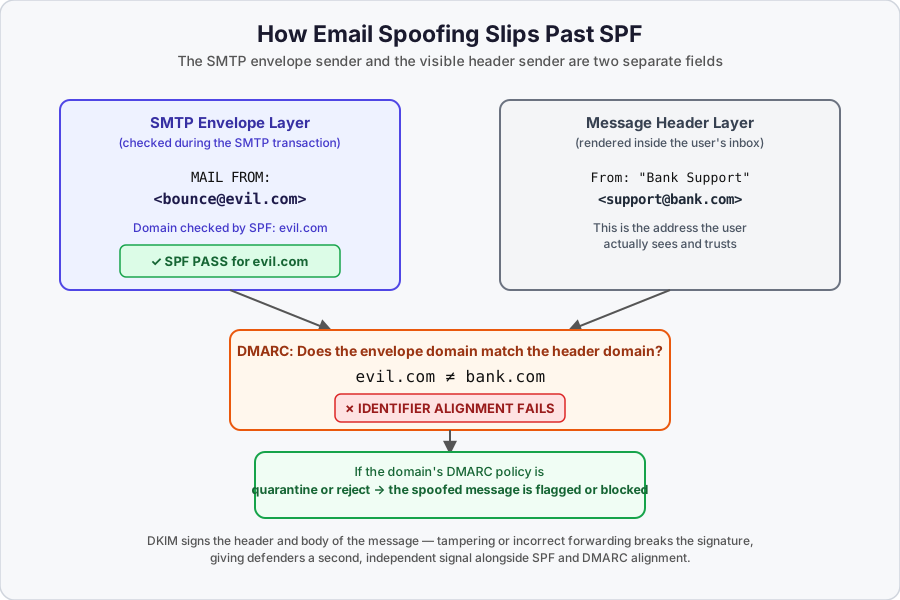
The diagram above shows the actual failure mode: an attacker can get SPF to legitimately pass for their own domain (evil.com) on the envelope, while the header the user sees claims to be bank.com. SPF alone never catches this. DMARC is what checks whether those two domains actually align.
Stopping Spoofing: SPF, DKIM, and DMARC
A typical legitimate business email flow looks like this: your company sends a message → your domain’s DNS holds your SPF, DKIM, and DMARC records → the message may go out through a third-party sending service (like SendGrid) → the receiving provider (Gmail, Outlook, etc.) checks your domain’s DNS records to confirm the message is actually authorized to come from you.
Each of the three protocols checks a different thing, and they weren’t all designed to catch the same gap.
SPF (Sender Policy Framework)
SPF publishes a list of IP addresses authorized to send mail for a domain, as a DNS TXT record.
v=spf1 ip4:192.168.0.1 -all
Breaking that down:
v=spf1: version tag, alwaysspf1.- Mechanisms: define which IPs (or other sources) are authorized.
- Qualifiers: define what happens on a match.
- Modifiers: extend behavior (redirect, explanation text).
Mechanisms:
| Mechanism | What it does |
|---|---|
ip4 | Match a specific IPv4 address or range |
ip6 | Match a specific IPv6 address or range |
a | Match if the domain’s A/AAAA record resolves to the sender’s IP |
mx | Match if the domain’s MX record resolves to the sender’s IP |
ptr | Reverse DNS match (deprecated, don’t use) |
exists | Match if a domain resolves to any address (rarely used) |
include | Pull in another domain’s SPF policy |
all | Catch-all, always matches; used at the end |
Qualifiers:
| Qualifier | Meaning | Effect |
|---|---|---|
+ | PASS | Authorized (default, can be omitted) |
? | NEUTRAL | No opinion, treated like no policy |
~ | SOFTFAIL | Suspicious but usually still accepted, typically tagged |
- | FAIL | Unauthorized, reject |
Common misconception:
~allmeans failIt doesn’t.
~allis a softfail: the message is typically still accepted, just flagged. Only-allis a hard fail.
Modifiers:
redirect=otherdomain.com: delegates the entire SPF evaluation to another domain’s record, replacingall.exp=explain.domain.com: provides a human-readable failure explanation (rarely used).
The distinction between include and redirect trips people up constantly:
v=spf1 include:_spf.partner.com -all
→ If partner.com's SPF fails, processing CONTINUES to -all (hard fail)

v=spf1 redirect=_spf.partner.com
→ Result is ENTIRELY based on partner.com's SPF evaluation. No fallback.
include is a mechanism: if it fails, evaluation keeps going to whatever comes next. redirect is a modifier: its result is final.
The 10-DNS-lookup limit: SPF caps DNS lookups at 10 per check, to prevent it from being used as a denial-of-service vector. include, a, mx, ptr, exists, and redirect all count toward that limit (including any nested includes inside those domains). all, ip4, and ip6 do not, since they don’t require a DNS lookup.
v=spf1 ip4:1.1.1.1 ip4:2.2.2.2 ip4:3.3.3.3 ip6:2001:db8::1 -all
→ DNS lookups used: 0

v=spf1 include:spf.google.com include:spf.outlook.com a mx -all
→ DNS lookups used: 4 (plus whatever nested includes add)
Exceeding the limit returns a PermError, which DMARC treats as a fail:
Authentication-Results: spf=permerror (too many DNS lookups)
How Spoofing Bypasses SPF Anyway
This is the part that’s easy to misunderstand, so it’s worth walking through directly.
Wait, if SPF checks the sender's domain, doesn't that stop spoofing?
It stops an attacker from successfully claiming to send as
bank.comat the SPF level. It does not stop them from puttingsupport@bank.comin the visible header while actually authenticating as a completely different domain they control.
Here’s how: attackers register their own domain (say, evil.com) and set up SPF for it correctly, the same legitimate way any real company sets up SPF for their own domain:
v=spf1 ip4:203.0.113.50 -all
Now when they send MAIL FROM:<something@evil.com>, the receiving server checks SPF for evil.com, sees the sending IP is authorized, and SPF passes, because as far as SPF is concerned, this is a completely legitimate message from evil.com. They’re not touching bank.com’s SPF record at all; they don’t control it and don’t need to. They just put From: support@bank.com in the message header, which SPF never inspects.
This is exactly the gap DMARC exists to close, through what’s called identifier alignment: checking whether the domain SPF just validated actually matches the domain shown in the header.
Common SPF Pitfalls
- Confusing envelope-from with header-from: SPF only checks the envelope-from. It’s easy to assume it protects the visible sender address; it doesn’t.
- Thinking
~allmeans fail: it’s a softfail, not a hard fail. - Forgetting the 10-lookup limit: if you see “PermError” or “too many DNS lookups,” this is what it’s referring to.
- Mixing up
includeandredirect:includecontinues on failure;redirectis final. - Assuming SPF survives forwarding: when a message is forwarded through a server not on the original domain’s SPF list, SPF breaks. This is one of the reasons DKIM exists alongside it.
What a real, correctly-authenticated email looks like
Here’s a constructed example (not a live capture, so there’s nothing personal in it) showing what these headers look like when everything aligns and passes:
Authentication-Results: mx.examplemail.test;
    spf=pass (sender IP is authorized) smtp.mailfrom=northbridgeanalytics.io;
    dkim=pass (signature was verified) header.d=northbridgeanalytics.io;
    dmarc=pass (p=reject sp=reject dis=none) header.from=northbridgeanalytics.io
Return-Path: <alerts@northbridgeanalytics.io>
From: "Northbridge Analytics" <alerts@northbridgeanalytics.io>
To: security-team@examplemail.test
Notice the three domains all line up: the smtp.mailfrom domain SPF checked, the header.d domain DKIM checked, and the header.from domain the recipient actually sees are all northbridgeanalytics.io. That alignment is exactly what dmarc=pass is reporting. Compare that against the evil.com / bank.com example earlier: same three fields, but misaligned, which is what a dmarc=fail version of this header would show instead.
DKIM (DomainKeys Identified Mail)
If SPF is about checking whether the delivery truck was authorized to be on a given route, DKIM is more like a wax seal pressed into the letter itself: it doesn’t care who delivered it, it cares whether the letter was altered after the sender sealed it.
Here’s the mechanism in plain terms: before a message leaves the sending server, that server signs it with a private key, producing a cryptographic signature attached as a DKIM-Signature header. Anyone who wants to verify that signature looks up the matching public key from the sender’s DNS; no coordination beyond that DNS lookup is needed.
A DKIM-Signature header looks roughly like this (illustrative structure, not a live capture):
DKIM-Signature: v=1; a=rsa-sha256; c=relaxed/relaxed;
    d=example.com; s=selector1;
    h=from:to:subject:date;
    bh=<body hash>;
    b=<signature>
Walking through what a receiving server actually does with this: it reads the s= tag to know which DNS selector to look up, pulls the domain’s DKIM record from DNS, and extracts the public key sitting in that record’s p= tag. From there, it hashes the exact headers and body that were signed (specified by h=), using whatever algorithm the a= tag names, and compares that hash against what it gets from decrypting the b= signature with the public key. A match means the message hasn’t been altered since signing; no match means either tampering or a broken signature somewhere along the way.
One detail that matters in practice: verification only checks whatever was actually included in the signed set (h=). If something outside that set changes (a header nobody bothered to sign), DKIM doesn’t care. But if anything inside the signed set changes, even something small, the whole signature breaks.
Here’s what that looks like filled in with realistic-length values instead of placeholders (again, a constructed example built to match the real structure, not a captured header):
DKIM-Signature: v=1; a=rsa-sha256; c=relaxed/relaxed;
    d=northbridgeanalytics.io; s=mail2026;
    h=from:to:subject:date:message-id;
    bh=2jmj7l5rSw0yVb/vlWAYkK/YBwk=;
    b=QpN4vG8x2yTz1kR9mHdL7fJcW3eS6oU0aB5nD8qX2rY7tK1vM4pC9zA3wE6iF0h
      L2gJ5sN8bV1xR4kT7mQ0yD3fH6oC9pZ2uA5eW8iK1nM4tX7vL0rS3jN6fQ9bH2c==
Notice d=northbridgeanalytics.io in the signature matches the From: domain in the aligned example above; that’s the DKIM half of the alignment check DMARC performs. If an attacker signed a message with their own valid DKIM key for evil.com, d= would say evil.com, and DMARC would catch the mismatch against a From: header claiming bank.com, the same way it does on the SPF side.
DMARC (Domain-based Message Authentication, Reporting & Conformance)
DMARC is the protocol that actually ties SPF and DKIM together, and it’s the piece that closes the exact gap the evil.com example above exploits.
What DMARC actually checks: identifier alignment. A message passes DMARC if either of the following is true:
- SPF passes, and the domain SPF validated matches the domain in the visible
From:header, or - DKIM passes, and the domain in the DKIM signature (
d=) matches the domain in the visibleFrom:header.
Going back to the earlier example: SPF passed for evil.com, but the header claimed bank.com. Those domains don’t align, so even though SPF technically passed, DMARC fails the message overall. This is the check SPF alone was never designed to perform.
A DMARC record is published in DNS as a TXT record too:
v=DMARC1; p=reject; pct=100; rua=mailto:aggregate@reporting.com; adkim=s; aspf=r
v=DMARC1: version tag.p=: the policy applied to messages that fail alignment:none(monitor only, take no action),quarantine(send to spam/junk), orreject(block outright).pct=: the percentage of failing messages the policy applies to, useful for a gradual rollout.rua=: where aggregate reports (daily summaries of pass/fail activity) get sent.ruf=: where forensic reports (detailed failure samples) get sent, when supported.adkim=/aspf=: alignment mode for DKIM and SPF respectively:s(strict, domains must match exactly) orr(relaxed, subdomains of the organizational domain are accepted).
Common DMARC misunderstanding
Publishing a DMARC record with
p=nonedoesn’t block or flag anything on its own; it only turns on reporting so you can see what’s passing and failing. Moving toquarantineorrejectis what actually enforces the policy. Most guidance recommends starting atnoneto monitor before tightening it, so legitimate mail (forwarders, mailing lists, third-party senders you forgot to authorize) doesn’t get blocked by accident.
External Destination Verification (EDV): if your rua/ruf reporting address points to a mailbox on a different domain than the one publishing the DMARC record, that third-party domain has to explicitly authorize receiving those reports; otherwise attackers could redirect someone else’s DMARC reports to themselves. This authorization is published as its own DNS record:
*._report._dmarc.reporting.com
This EDV record is scoped per domain; an authorization for example.com’s reports to go to aggregate@reporting.com doesn’t automatically cover anotherexample.com. That needs its own EDV record too.
Even Legitimate Email Can Fail These Checks
None of this is “set once and forget it.” A few ways real, authorized mail can still fail:
- SPF breaks if the DNS lookup count goes over 10, which is easy to hit once a company adds a few third-party sending tools without pruning old
includes. - Adding a new email-sending service means SPF and DKIM both need updating for it.
- Any unplanned change to SPF DNS records, or a DKIM key that’s rotated on the sending side but not updated everywhere it’s referenced, will break authentication for otherwise legitimate mail.
- When SPF or DKIM fail, receiving servers may mark the message as spam or reject it outright.
- Because of all this, SPF/DKIM/DMARC status is worth actively monitoring rather than assuming it just keeps working; DMARC’s aggregate reports (
rua) exist specifically for this.
Recognizing Phishing and Spoofing in Practice
The protocol-level detail matters for defenders and for building detection rules, but a lot of phishing still gets caught (or missed) at the human level. A few practical checks that follow directly from everything above:
- Most mail clients let you view the raw headers (Gmail: “Show original”; Outlook: “Message source” or internet headers). Comparing the envelope sender against the header
From:address is exactly the mismatch this article has been describing, and it’s visible if you know where to look. - A display name (“Bank Support”) is not the same as the address behind it. Always check the actual domain, not just what’s rendered.
- Look-alike domains (
bank-support.com,bankk.com) are common because they’re cheap to register and easy to miss at a glance. - Hover over links before clicking; the visible text and the actual destination URL are frequently different.
- Urgency plus a financial or credential request, especially one claiming to be from an executive, is the classic pattern behind BEC. It’s worth treating as a red flag on its own, independent of whether the email otherwise looks legitimate.
- Report suspicious messages rather than just deleting them; aggregate reporting only works if failures actually get surfaced.
Key Takeaways
- Email has two separate senders: the envelope sender (checked by SPF) and the header sender (what the user sees). Nothing forces these to match, and that gap is the foundation of email spoofing.
- SPF authorizes sending IPs for a domain but only ever checks the envelope sender; it can pass cleanly for an attacker’s own domain while the visible header claims to be someone else entirely.
- DKIM cryptographically signs the message itself, which is what lets it survive things like forwarding that break SPF.
- DMARC is the protocol that actually connects SPF/DKIM results to the visible header address, through identifier alignment: the specific mechanism that catches the spoofing case SPF alone misses.
- None of these are “install once”: DNS lookup limits, key rotation, and new third-party senders can all silently break authentication for legitimate mail, which is why ongoing monitoring matters.
- If you want the full protocol mechanics behind all of this (ports, TLS, and the raw SMTP transaction), that’s covered separately in SMTP - LAYER 7 - Application.